
WristMic 腕麦

Your wrist.
Your Mac mic.

Turn Apple Watch into a wireless microphone for dictation and voice calls on Mac.

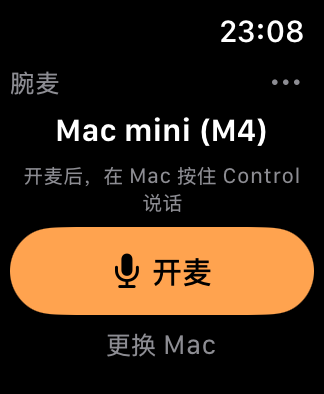
WristMic Watch interface, shown in Chinese

Hold Control.
Speak your next line.

Start the mic on Watch, focus a text field on Mac, hold Control and speak. Release to transcribe and insert.

Recognition runs locally on Mac after a one-time model download. Optional pause detection can insert text automatically.

A microphone
for your calls, too.

Send Watch audio to a compatible calling or recording app.

Calls require the separately installed free BlackHole 2ch driver. Keep your normal speakers or headphones for playback.

Configure call audio ↗

Made for two devices.

The Watch app is a one-time purchase; the Mac companion is free. The Watch app is being prepared for the App Store and is not available for purchase yet.

Launch price planned at CNY 48 in mainland China; local App Store prices vary. Current app interface is in Simplified Chinese.

Mac companion 1.0

Release candidate. Requires the Watch test app until the store launch.

Download for Mac

macOS 14+ · Apple silicon and Intel
Checksum · Install & update

Before you buy

Requires watchOS 10+ and a reachable local network. Dictation works without BlackHole. Calls require BlackHole 2ch and input-device selection in your calling app.